Add an SSH key to your account
SSH keys added to your profile are synced to every project you belong to, so any instance you launch with My SSH keys picked at boot will accept them.
This page covers user-level SSH keys. To pick a key when launching a specific instance, see Launching an Instance.
Prerequisites
- A signed-in Breqwatr Cloud account.
- An SSH key pair on your machine. If you don't have one yet, see Key pairs.
Steps
1. Add a key
-
Open Profile from the avatar menu and find the SSH Keys card.
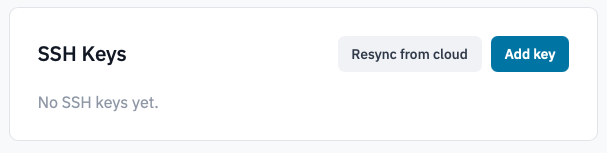
Profile SSH Keys card.
-
Click Add key.
-
In the dialog:
- Name — a label so you can tell keys apart later. The
machine the key lives on is a good choice (
my-laptop,prod-bastion). - Public key — paste the full public key. Either RSA
(
ssh-rsa AAAA...) or ED25519 (ssh-ed25519 AAAA...) keys are accepted.
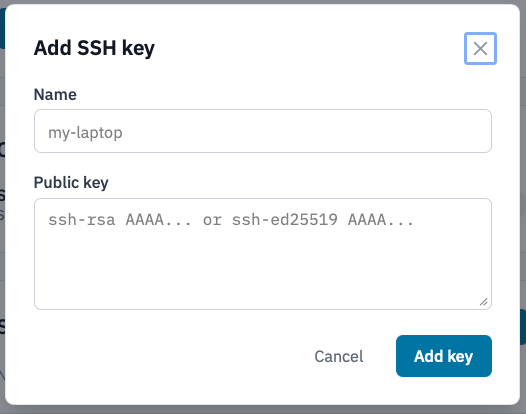
Add SSH key dialog.
Get the public key with:
- Name — a label so you can tell keys apart later. The
machine the key lives on is a good choice (
-
Click Add key.
The key is added to your account and synced to every project you belong to in the background.
2. Delete a key
- In the SSH Keys card, click Delete next to the key.
-
Confirm by typing the key's name in the dialog and clicking Delete key.
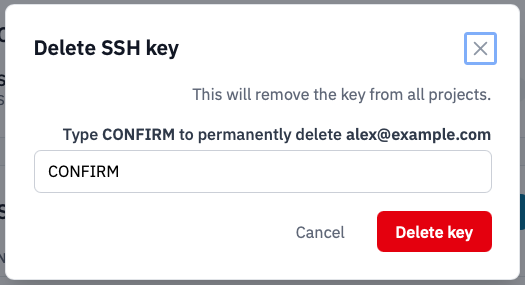
Delete SSH key confirmation.
The key is removed from your account and from every project it
was synced to.
3. Resync to the cloud
If a project's key list ever falls out of sync with your profile (for example, a key was deleted in OpenStack directly), use Resync from cloud to reconcile.
-
Click Resync from cloud at the top of the SSH Keys card.
SSH Keys card with the "Resync from cloud" button highlighted.
The Portal pushes every key on your profile to every project you belong to.
Verification
- A newly added key appears in the SSH Keys table with its fingerprint and added-on date.
-
Launch a new instance that includes the key, then connect with the matching private key:
Next steps
- Launch an instance
- Configure security groups
- Create application credentials for the OpenStack CLI.