Retention policy
The retention policy is a project-wide rule that automatically deletes old tags so your registry storage doesn't grow forever. It runs once a day and is opt-in — by default, nothing is deleted.
Prerequisites
- The container registry turned on for the project.
- An organisation you're a member of as owner or admin. Members can view the policy but can't change it.
How the rules work
The policy has two independent rules. Setting both means a tag is deleted if it matches either rule (the rules OR together):
- Keep last N tags — within each repository, sorts tags by
last-pushed timestamp newest-first and deletes everything beyond
the Nth tag. Setting
10on a repo with 25 tags deletes the 15 oldest. Leave blank to disable this rule. - Delete tags older than (days) — deletes any tag whose
last-pushed timestamp is older than the threshold. Setting
30deletes any tag that hasn't been re-pushed in the last 30 days. Leave blank to disable this rule.
The policy applies project-wide — every repo in the project follows the same two thresholds. There's no per-repo override today.
Steps
1. Configure the policy
-
Open the project, click Container registry, then Retention policy.
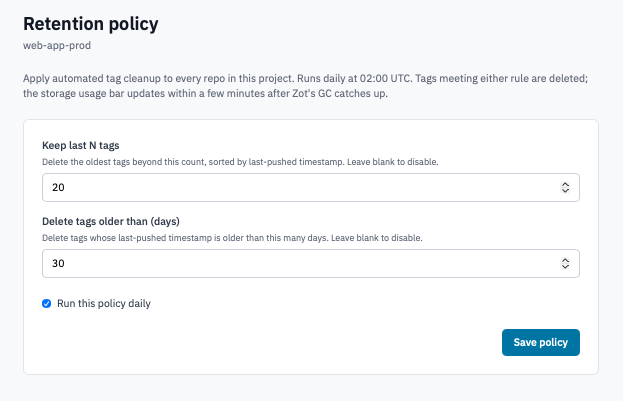
Retention policy page with the two rule inputs.
-
Fill in one or both rules:
- Keep last N tags — e.g.
10. - Delete tags older than (days) — e.g.
30.
- Keep last N tags — e.g.
-
Tick Run this policy daily to enable the policy.
-
Click Save policy.
The policy runs daily at 02:00 UTC. The first run after saving may take a few minutes longer than subsequent runs while it inventories the whole project.
2. Watch storage drop
After the policy runs:
- Open the Container registry page on the project.
- Watch the Storage bar. Storage drops once the registry's garbage collection catches up after the policy delete — usually within a few minutes of the policy run.
3. Clear the policy
If you no longer want automatic cleanup:
-
On the Retention policy page, click Clear policy.
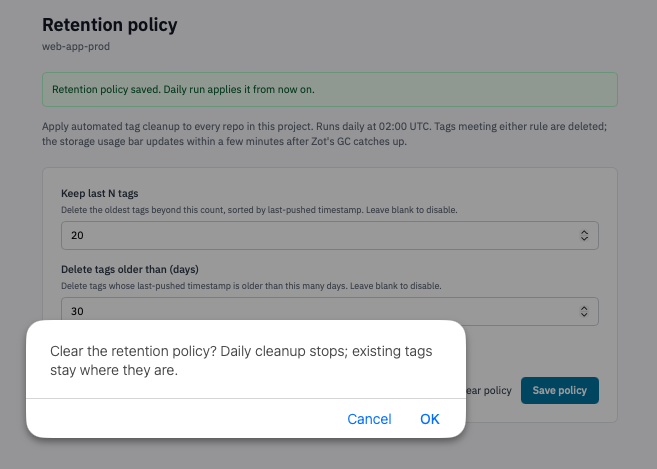
Retention policy page with the Clear policy link visible alongside Save.
-
Confirm the prompt.
Daily cleanup stops immediately. Existing tags stay where they are — clearing the policy doesn't restore tags it deleted on previous runs, but it also doesn't perform any new deletions.
Verification
- After saving, the page reflects the values you entered and the enabled checkbox stays ticked.
- After the next 02:00 UTC run, the storage usage bar on the registry overview drops by however much the deleted tags contributed.
- A tag that should have been deleted no longer shows in the Manage repositories view; attempting to pull it returns a manifest-not-found error.
Caveats
- Latency tolerance: the storage bar takes a few minutes to settle after the policy run because the registry's garbage collector runs on its own schedule. Don't read the bar in the same minute the policy fires.
- The policy can't distinguish "important" tags from "throwaway"
tags. If you have a release tag you never want deleted (e.g.
latest), make sure your build process re-pushes it inside the "older than (days)" window, or pin it with manual care and don't rely on retention to spare it.
Next steps
- Manage repositories — verify which tags survived the last run.
- Turn on the registry — review the current plan if you keep hitting the cap even with retention on.